


My OldBoy! - GBC Emulator
4.1968.00 Reviews
App Specs
- Version
- Varies with Device
- Updated On
- License
- $3.99
- Downloads
- 500,000+
- Developer
- Pixel Respawn LLC
- Categories
- Arcade
- Platform
- Android
Screenshots
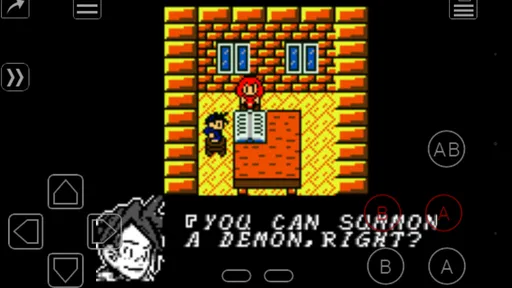
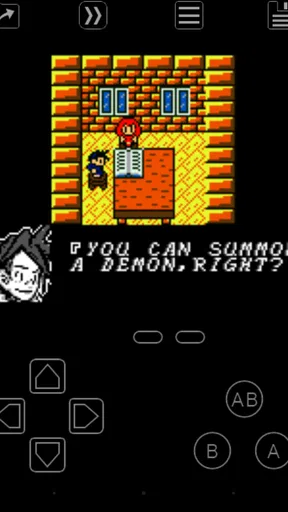
 Analysis by AppCompare
Have you ever found yourself longing for the good old days of gaming, when everything was simpler, and it was all about pure fun? Well, I certainly have, and that's why I was thrilled to try out My OldBoy! - GBC Emulator. This app promises to bring back the nostalgic vibes of the classic Game Boy Color games right to your smartphone. Whether you’re an Android or iOS user, this emulator might just be what you need to relive those cherished memories.
That appeal is easiest to judge when you think about how you actually play now: in short gaps between errands, during a commute, or at home with time for a longer session. A phone is convenient, but its flat glass controls are not the same as a handheld’s physical buttons. I would treat this as a way to make a personal library of Game Boy Color games easier to carry, not as a perfect replacement for original hardware.
First Impressions and Setup
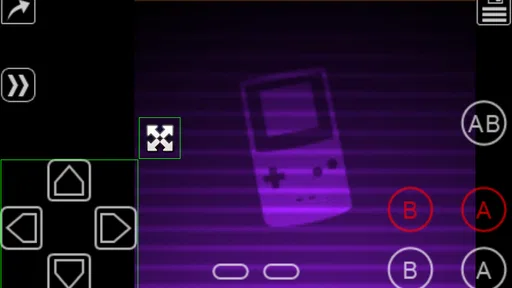
The first thing I noticed about My OldBoy! - GBC Emulator was its straightforward installation process. You can find it easily on the Google Play Store or the App Store, and downloading it is a breeze. Once installed, the app welcomes you with a clean and intuitive interface. There's something inherently satisfying about seeing the virtual Game Boy Color screen pop up on your phone.
My practical advice is to sort out your game files before settling in for a session. An emulator is only one part of the experience: you also need game files you are entitled to use, and the way you organize them affects how quickly you can return to a particular title. Keeping a small, clearly named collection is more pleasant than scrolling through a cluttered folder, especially when you only have a few minutes to play.
Setting it up is as simple as pie. All you need are your favorite GBC ROMs, which you can load onto the emulator. The app supports a wide range of file types, so you won't have any trouble getting your games up and running. Within minutes, I was transported back to the pixelated worlds of my childhood.
It is worth separating the emulator from the games themselves. My OldBoy! is the tool for running compatible Game Boy Color software; it is not a reason to assume that every game is included or that any ROM is automatically lawful to download. If you already have legitimate files ready, setup is much more direct. If you are expecting an all-in-one package with a built-in catalogue, this is not the right kind of product.
Features that Stand Out
One of the standout features of My OldBoy! is its incredible compatibility. The emulator runs virtually all GBC games without a hitch. The performance is seamless, and I didn't experience any lag or crashes, which is crucial when you’re in the middle of an intense gaming session.
Worth Reading Before You Choose

EA SPORTS FC Mobile 26 Is a Bigger Football Game, but It Takes Time

Flipboard Shows What News Apps Must Do Beyond the Feed

Switching to Android Auto Means Rethinking Your Driving Routine

Google Calendar Makes a Crowded Week Easier to Manage

Ludo King Makes the Most of the Minutes Between Plans

Baby Panda World Brings Quick Play to Modern Phones, but Its Game Library Feels Busy
The useful question is not only whether a game starts, but whether the controls suit that game. A slower, turn-based adventure is generally more forgiving on a touchscreen than a platform game that asks for precise jumps and quick direction changes. I would try the virtual layout during a low-pressure section first, then adjust the buttons before reaching a difficult sequence. That small bit of preparation can make a longer session less irritating.
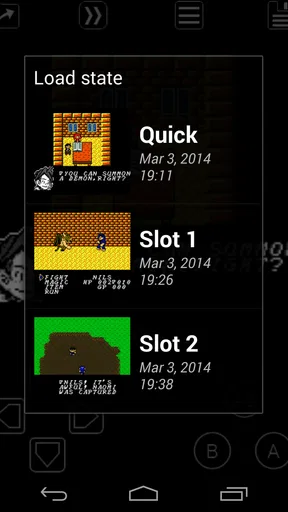
What really caught my eye was the customizable controls. You can tweak the on-screen buttons to your liking, which is great because everyone has their own preferred setup. Plus, if you’re someone who loves to save your game progress frequently, the app’s save and load states feature will be your best friend. It supports quick saves, so you’ll never lose your place in the game.
Quick states are most valuable when used deliberately. I like them as a convenience for pausing in the middle of a session, or as a temporary checkpoint before a tricky passage. They are not quite the same thing as a game’s own save system: relying only on a state can make it harder to keep track of the intended progress in a long-running game. Using both where appropriate gives you flexibility without turning every play session into a collection of confusing snapshots.
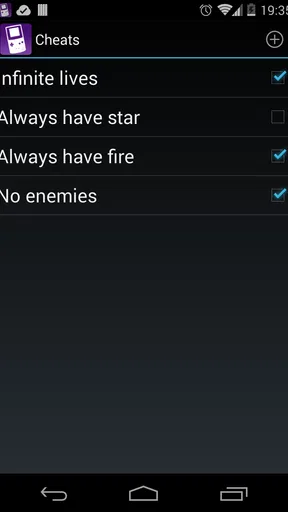
The app also offers some nifty features like fast-forwarding, which allows you to speed through those slow sections of a game, and even cheats support, for those times when you need a little extra help.
Fast-forward can be a practical tool rather than just a shortcut. It helps when a game makes you repeat a familiar stretch or wait through a slow sequence, but it can also make it easier to miss a cue or overshoot an action if you leave it on during active play. I would switch it on for repetition and turn it off before a new encounter. Cheats are similarly best treated as optional: they can make an old game more approachable, though using them may change the challenge or the sense of progress you wanted from the original.
Visuals and Audio Experience
When it comes to visual quality, My OldBoy! does not disappoint. The emulator accurately reproduces the graphics of the original Game Boy Color, offering a crisp and vibrant display. You can even apply filters to enhance the visual experience, making those old games look better than ever on modern screens.
There is a trade-off in choosing how to display pixel art on a phone. A filter may soften or reshape the image in a way that looks appealing to one person and less faithful to another. I would compare the available presentation options with a familiar game rather than assume that an effect is automatically an improvement. The right choice depends on whether you prefer a clean, sharp image or a more altered look.
The sound emulation is equally impressive. The nostalgic chiptunes and sound effects are faithfully replicated, bringing back memories of hours spent hunched over the handheld device, totally engrossed in the game’s world. Pop in your earbuds, and you might feel like you’re right back in the 90s.
For everyday use, sound also affects where this works best. Earbuds make a quiet puzzle session more immersive, while playing aloud may not suit a shared room or a public place. I would check the phone’s volume before starting; classic sound effects can be more noticeable than expected when a game is quiet and then suddenly plays a bright alert. That is a small convenience issue, but it makes the app easier to fit into real routines.
Overall Gaming Experience
Playing on My OldBoy! is a trip down memory lane, and it does a fantastic job of capturing the essence of the original GBC experience. The tactile feedback of the on-screen buttons is surprisingly good, and the range of features like multiplayer support via link cable emulation really adds to the fun.
Link cable emulation is a particularly interesting reason to choose this over a basic single-player emulator, since it brings a classic multiplayer idea into a phone-based setup. I would consider it most useful if you already have a specific compatible game and another player in mind; it is not a feature that adds much to a solo session by itself. Before planning a get-together around it, make sure the game you want to play is one that uses link play, rather than assuming every title has a multiplayer mode.
For a realistic day-to-day example, imagine having a short wait before an appointment. You can open a familiar game, play a brief section, and use a quick state to stop without needing to find a physical cartridge or handheld. Later, at home, you can spend longer with the same game and adjust the controls for comfort. That mix of short sessions and more deliberate play is where a phone emulator makes the most sense to me.
Compared with a dedicated retro handheld, a phone is already with you and avoids carrying another device, but its touchscreen buttons have less physical definition. Compared with a simpler emulator, My OldBoy!’s combination of convenience features and link cable emulation gives it more appeal for someone who wants more than basic launching and play. If tactile controls matter most, a handheld with physical buttons is the better fit; if portability and quick access matter more, this app has a clearer case.
One thing I appreciated was how the app doesn’t bombard you with ads or unnecessary distractions. It’s all about the games, and that’s refreshing. The premium version offers even more features, but the free version is more than sufficient for a satisfying gaming experience.
Cost deserves a careful look before buying. My OldBoy! is a paid game from Pixel Respawn LLC, listed at $3.99, so this is not a free download with a paid upgrade implied by the price. The purchase makes most sense if you expect to use its emulator features regularly; if you only want to test whether touchscreen retro gaming suits you, compare the available options on your platform before committing. I would not assume that a separate free version has the same feature set based on the paid price alone.
The price is easier to justify for someone who already has a library of Game Boy Color games and wants a dependable way to revisit them, particularly if fast-forward, quick states, or link play are features they will actually use. It is less compelling for a casual player who expects a catalogue of included games, or someone who will play only once out of curiosity. There is no point paying for tools you do not need, and the strongest value here comes from making regular play more convenient.
There is also a useful distinction between the app’s audience and its technical role. My OldBoy! is an emulator, not a modern arcade game with its own levels or story. The store lists it in the arcade category, but a player should choose it for running compatible GBC titles, not for a new game experience created by the developer. The age rating is Everyone, which makes the app suitable for a broad audience; the content of the game files you choose still shapes what you actually play.
Final Thoughts
In conclusion, My OldBoy! - GBC Emulator is a fantastic choice for anyone looking to relive the golden age of Game Boy Color games. It's easy to use, packed with features, and delivers a smooth, authentic experience that will have you hooked from the get-go. Whether you're revisiting your childhood favorites or discovering classic titles for the first time, this emulator is a must-have for any retro gaming enthusiast.
My recommendation is more measured if you are new to emulation. The basic idea is simple, but finding and organizing game files is part of the experience, and the legal status of files depends on how you obtain them. Someone who wants a ready-made selection of games with no setup should look elsewhere. Someone who already knows which titles they want to play will have a much clearer path from installation to a useful session.
The game has an average rating of 3.9 from around 8,600 ratings, with about 960 written reviews, and has passed 500,000 installs. Those figures suggest that plenty of players have tried it, though they cannot tell you whether its controls will suit your hands or whether your favorite game will be the one you want to run. I would use the rating as a broad signal of interest, then decide based on your own need for GBC emulation and the value of its particular tools.
So, if you’re ready to dive back into the world of pixelated adventures and catchy chiptunes, give My OldBoy! a try. Who knew nostalgia could fit so perfectly in the palm of your hand?
Pros
- Fast and smooth gameplay experience.
- Supports cheat codes for customization.
- Save and load game states easily.
- Wide range of compatible ROMs.
- Minimal battery consumption.
Cons
- Ads can be intrusive at times.
- Limited free version features.
- Requires ROMs to be downloaded separately.
- No multiplayer support.
- Occasional sound glitches.
FAQs for My OldBoy! - GBC Emulator
What is My OldBoy! - GBC Emulator?
My OldBoy! is a full-featured and fast Game Boy Color emulator for Android and iOS devices. It allows users to play their favorite Game Boy games on their smartphones with high compatibility and smooth performance. It supports link cable emulation, cheat codes, and has customizable controls.
Is My OldBoy! legal to use?
The My OldBoy! emulator itself is legal to use; however, downloading ROM files for games you do not own is illegal in many countries. It’s important to only use ROMs from games you own physically to comply with copyright laws, ensuring a legal gaming experience.
What are the key features of My OldBoy!?
My OldBoy! offers a range of features including high compatibility with Game Boy games, fast emulation speed, link cable emulation via Bluetooth or Wi-Fi, cheat code support, and customizable controls. It also supports OpenGL rendering and has features like fast-forward and save states.
Does My OldBoy! support multiplayer gaming?
Yes, My OldBoy! supports multiplayer gaming through link cable emulation. You can connect with other devices via Bluetooth or Wi-Fi to play your favorite multiplayer Game Boy Color games with friends, providing a classic gaming experience on modern devices.
What devices are compatible with My OldBoy!?
My OldBoy! is compatible with most Android and iOS devices. For optimal performance, it is recommended to have a device with at least a dual-core CPU. The emulator supports a wide range of screen sizes and resolutions, ensuring a seamless gaming experience across different devices.


